

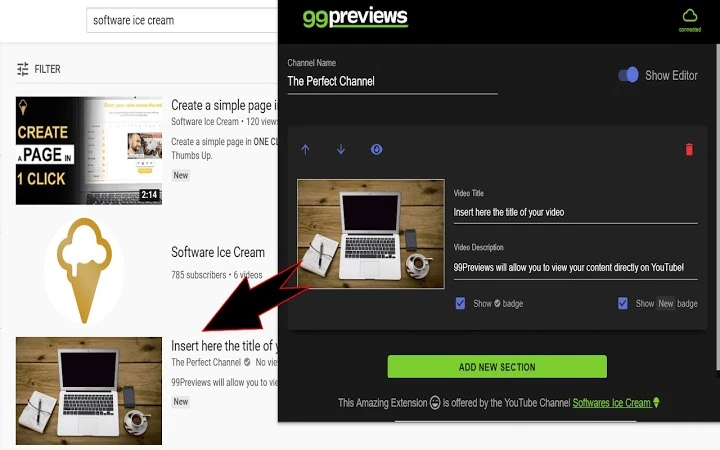
Description
99 Previews: Optimize YouTube Titles & Thumbnails
Overview
99 Previews is a Chrome extension designed to help content creators optimize their YouTube video titles and thumbnails before publishing. The tool enables users to preview how their content will appear in real-world YouTube environments, including search results and video suggestions. By testing multiple title and thumbnail combinations, creators can identify the most effective combinations to maximize viewer engagement and increase click-through rates. This tool is particularly useful for YouTubers, digital marketers, and video creators focused on growing their audience through strategic content presentation.
Unlike traditional tools that only offer static previews, 99 Previews delivers live, interactive previews that simulate actual YouTube interface behavior. This allows creators to assess visual appeal, text clarity, and overall composition in context. The extension is built specifically for creators who rely on strong thumbnails and compelling titles to stand out in a crowded platform. Its primary purpose is to reduce guesswork in content optimization and support data-driven decisions prior to upload.
Key Features & Capabilities
- Live preview on search pages – View how your title and thumbnail will appear when your video shows up in YouTube search results, helping you test visibility and appeal.
- Preview in video suggestions – See how your content appears in YouTube’s recommended video section, which is critical for maximizing reach and engagement.
- Unlimited title and thumbnail variations – Test multiple combinations without restrictions, allowing for thorough A/B testing before publishing.
- Up and down preview navigation – Easily cycle through different title and thumbnail pairs to compare effectiveness and select the best-performing option.
These features enable creators to refine their content strategy by observing how visual and textual elements interact in real YouTube contexts. For example, a creator can test whether a bold font or contrasting color improves click-through potential. The ability to preview in both search and suggestions provides a holistic view of how content will be perceived across key discovery pathways.
User Interface, Workflow & Performance
The interface of 99 Previews is designed to be minimal and non-intrusive, integrating seamlessly into the Chrome browser environment. Users access the preview function directly from the YouTube page, without requiring additional tabs or complex workflows. The extension overlays preview data in a clean, organized layout that mirrors YouTube’s actual UI, ensuring accurate representation.
Navigating between title and thumbnail variations is straightforward, with intuitive up and down controls. The workflow is streamlined: create a title and thumbnail, activate the preview, and cycle through options to evaluate performance. The developer did not specify resource usage details, but the extension’s small size (1.2 MB) suggests efficient memory and CPU handling. Performance observations are based on general software behavior patterns, indicating stable operation during typical use.
Compatibility & System Requirements
99 Previews is compatible with Windows, Mac, and Linux operating systems, making it accessible to a broad range of users across different platforms. It functions as a Chrome extension, requiring the Chrome browser to operate. The installation size is 1.2 MB, which is minimal and unlikely to impact system performance significantly.
Exact system requirements were not listed. The developer did not provide additional system requirements. Compatibility information is limited to the supported operating systems and browser dependency. Users should ensure they are running a current version of Chrome to maintain optimal functionality.
Pros and Cons
Pros
- Real-time, accurate previews of titles and thumbnails on actual YouTube interfaces
- Supports unlimited testing of title and thumbnail combinations
- Works in both search results and video suggestions—key discovery areas
- Lightweight installation (1.2 MB) with minimal system impact
- Free to use with no hidden costs or subscription models
Cons
- No information provided on update frequency or release schedule
- Only available as a Chrome extension—no support for other browsers
- Exact performance impact on browser speed or memory usage not disclosed
- Limited to YouTube-specific previews—no cross-platform or social media testing
FAQ Section
Is 99 Previews compatible with all browsers?
99 Previews is currently available only as a Chrome extension. It does not support other browsers at this time.
Is the extension safe to use with my YouTube account?
Yes, the extension operates within Chrome’s security framework and does not access or store personal data from your YouTube account. It only displays previews of your content.
How often does 99 Previews receive updates?
The developer did not specify the update frequency. The current version is 1.0.0, released on April 5, 2025.
Can I use 99 Previews offline?
Yes, the extension functions without an internet connection once installed. However, it requires an active YouTube session to display previews.
What type of license does 99 Previews have?
99 Previews is free to use. The developer did not specify a formal license type, but it is available at no cost for all users.
Final Thoughts + CTA
99 Previews offers a practical, no-cost solution for YouTube creators seeking to improve their video visibility and engagement. By enabling live previews of titles and thumbnails in real YouTube environments, it empowers users to make informed decisions before publishing. The ability to test multiple combinations without limitations is a significant advantage for content strategists and marketers.
While the extension is limited to Chrome and lacks detailed performance metrics, its lightweight design and free access make it a compelling tool for creators focused on YouTube SEO. For anyone serious about growing their channel through better content presentation, 99 Previews delivers tangible value with minimal friction.
Download 99 Previews now
Guides & Tutorials for 99Previews Extension for Chrome
How to install 99Previews Extension for Chrome
- Click the Preview / Download button above.
- Once redirected, accept the terms and click Install.
- Wait for the 99Previews Extension for Chrome download to finish on your device.
How to use 99Previews Extension for Chrome
This software is primarily used for its core features described above. Open the app after installation to explore its capabilities.
User Reviews for 99Previews Extension for Chrome 0
No reviews found





